7 Health Problems Your Watch Can Detect
By Kulmeet Kundlas MD, Board-Certified Internal Medicine | Shield Medical Group, Sebring and Lake Wales, Florida
Your apple watch heart rate monitor has nine medical-grade sensors sitting on your wrist right now — and most people use maybe one of them. Here is a number that should stop you in your tracks: the Apple Watch can detect signs of atrial fibrillation with up to 100 percent specificity for confirming a normal rhythm. That finding comes from a Cleveland Clinic study, not a marketing campaign.
Your Apple Watch heart rate monitor is more capable than you think. But here is the thing — your watch can flag seven different health problems, from sleep apnea to high blood pressure, and most people have no idea these features even exist. Worse, they get an alert and panic because nobody explained what it actually means.
I am Dr. Kulmeet Kundlas, board-certified in internal medicine, and I practice at Shield Medical Group in Sebring and Lake Wales, Florida. More and more patients walk into my office holding up their wrist saying, “Doc, my watch says something is wrong.” Sometimes that alert is life-saving. Other times, it causes weeks of unnecessary anxiety.
Your Apple Watch heart rate monitor deserves a proper explanation. Today, we are going through all seven health problems your Apple Watch can detect. I will explain the actual science behind each one and give you a clear playbook for what to do — and what not to do — with every single alert. Think of this as your owner’s manual for the medical device you are already wearing.
Watch the full video explanation below:
Can Your Apple Watch Heart Rate Monitor Detect Real Health Problems?
Here is the question I see everywhere — in my clinic, in online forums, in the comments of every tech review video: “Can my Apple Watch actually detect real health problems, or is this just expensive marketing?”
It is a great question. Right now there are two camps. Camp one says your Apple Watch is basically a mini hospital on your wrist. Camp two says it is a glorified step counter that causes health anxiety. The truth sits somewhere in the middle.
Your Apple Watch is packed with nine different sensors:
- Optical heart sensors
- Electrical heart sensor
- Accelerometer
- Gyroscope
- Barometer
- Temperature sensor
- Microphone
- Ambient light sensor
- GPS (geolocation receiver)
Using those sensors, it can screen for seven distinct health concerns:
- Atrial fibrillation (AFib)
- Abnormal heart rate (high or low)
- Signs of hypertension
- Sleep apnea
- Low cardio fitness (VO2 max)
- Noise-induced hearing damage
- Menstrual cycle irregularities
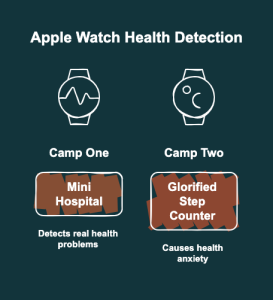
The key word is screen — not diagnose. That distinction is everything. Most people never set up these features properly, so the sensors sit there doing nothing. And when an alert does come through, there is no context for what it means. We live in an era where a consumer device on your wrist can detect a heart rhythm disorder before you ever feel a symptom, but nobody is teaching people how to use that power responsibly.
What the Science Says About All 7 Apple Watch Health Detections
1. Atrial Fibrillation (AFib)
The Apple Watch heart rate monitor shines here. This is the big one. Your Apple Watch has an FDA-cleared ECG app that records a single-lead electrocardiogram in thirty seconds. A Cleveland Clinic study found 98 percent accuracy comparing the watch’s ECG waveform to traditional clinical methods. Sensitivity for detecting AFib ranges from 93.5 to 100 percent. Specificity for confirming normal rhythm is 99 to 100 percent. The research strongly supports this as a legitimate screening tool.
2. Abnormal Heart Rate
The Apple Watch heart rate monitor tracks this around the clock. The watch continuously monitors your resting heart rate and alerts you if it goes above 120 or drops below 40 beats per minute while you have been inactive. Independent research from Duke University validated the optical sensor against clinical ECG. At rest, 98 percent of readings fall within 5 beats per minute of the true value. That is excellent accuracy for wearable health tech.
3. Signs of High Blood Pressure
Your Apple Watch heart rate monitor helps here too. I want to be very clear — your Apple Watch does not measure blood pressure. It cannot give you a number like 130 over 85. If you are wondering how to check blood pressure with your watch, here is what actually happens: the optical sensor analyzes your pulse wave patterns over 30 days using machine learning. If it detects consistent patterns suggestive of hypertension, it sends a notification. This is an FDA-cleared screening prompt, not a diagnosis. You still need a validated home blood pressure cuff to get actual numbers.
4. Sleep Apnea
The Apple Watch heart rate monitor supports sleep insights. The watch uses its accelerometer to detect breathing disturbances during sleep. Over 30 days, if 50 percent or more of your recorded nights show elevated disturbances, you get a notification for possible moderate-to-severe sleep apnea. This is also FDA-approved, but it is a flag — not a sleep study.
5. Low Cardio Fitness (VO2 Max)
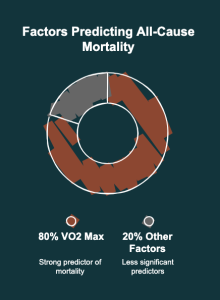
Your Apple Watch heart rate monitor factors into this estimate. There is strong evidence that VO2 max is one of the most powerful predictors of all-cause mortality. Your watch estimates this during outdoor walks, runs, or hikes with GPS enabled. If your cardio fitness level is low for your age and sex, you will receive an alert.
6. Noise-Induced Hearing Damage
The Apple Watch heart rate monitor is part of a wider sensor suite. The microphone monitors ambient decibel levels and warns you if sustained exposure could harm your hearing. The Noise app runs in the background and does not record or store audio.
7. Menstrual Cycle Irregularities
The Apple Watch heart rate monitor works alongside temperature sensing here. Cycle tracking includes irregular period detection and retrospective ovulation estimates using overnight wrist temperature sensing. The temperature sensor is accurate to within ±0.1°C.
How Your Apple Watch Heart Rate Monitor Sensors Actually Work Inside
So how does a watch on your wrist detect a heart rhythm problem? Let me give you the simple version.
Your Apple Watch heart rate monitor uses a clever trick. Think of the optical heart sensor like a tiny flashlight and a tiny camera. The watch flashes green light into your skin hundreds of times per second. When your heart beats, blood surges through the vessels in your wrist and absorbs more of that green light. Between beats, less blood means less absorption. The photodiode measures exactly how much light bounces back. By tracking those tiny fluctuations, the watch maps out your heartbeat. That technology is called photoplethysmography, or PPG.
For the ECG, the process is different. When you touch the Digital Crown, you close an electrical circuit across your body. The watch reads the tiny electrical signals your heart generates with each beat. It is the same basic principle as the ECG machines in my office, simplified to one lead instead of twelve.
For sleep apnea detection, the accelerometer is so sensitive it can detect the micro-movements your wrist makes as your chest rises and falls with each breath. When those movements stop or become irregular, it flags a breathing disturbance.
For blood pressure screening, the optical sensor analyzes how your blood vessels respond to each heartbeat — essentially measuring arterial stiffness — over thousands of passive readings across 30 days.
Here is the key takeaway: every single detection relies on trends and patterns, not single readings. Your watch is playing the long game. That is exactly what good medicine does.
Factors That Affect Sensor Accuracy
Several things can interfere with your readings:
- Dense wrist tattoos — ink can block the optical sensor’s light
- Cold weather — blood vessel constriction reduces skin perfusion
- Loose watch fit — the sensors need consistent skin contact
- Irregular movements — HIIT, boxing, and tennis create motion artifacts
- Medications — beta-blockers and caffeine alter heart rate responses
A single weird reading during a boxing workout does not mean your heart is failing.
Your Practical Playbook for Apple Watch Health Tracking
This is where we turn knowledge into action. Here is exactly how to set up and use each of the seven health features. If you want to know how to track sleep on Apple Watch or enable any other feature, follow these steps.
Step 1: Check Your Watch Model
The advanced features like hypertension notifications, sleep apnea detection, and the ECG app require Apple Watch Series 9 or newer, including the Ultra 2 and Ultra 3. The Apple Watch SE does not support these features. Open the Health app on your iPhone and make sure your age, sex, height, and weight are entered accurately. These are not optional — the algorithms use this data to personalize your alerts.
Step 2: Enable Each Feature
- Heart rate alerts: Open the Watch app, go to Heart, and set your high and low thresholds. Defaults of 120 and 40 BPM work for most people.
- AFib detection: Open the ECG app once and complete the setup. Enable Irregular Rhythm Notifications under Heart settings.
- Hypertension: Go to Health on your iPhone, tap Heart, then Blood Pressure, and enable Hypertension Notifications if available in your region.
- Sleep apnea: Enable Sleep tracking and wear your watch to bed consistently. The algorithm needs at least 10 nights of 4-plus hours of sleep data within a 30-day window.
- VO2 max: Do outdoor walks, runs, or hikes with GPS enabled. The watch calculates this automatically.
- Hearing health: Open the Noise app and enable notifications. I recommend setting the threshold at 80 decibels.
- Cycle tracking: Enable Cycle Tracking in Health and wear the watch to bed for temperature sensing.
Step 3: Daily Use
Most of this is passive. Wear your watch during the day and at night. The watch captures heart rate data about every two hours when you are still. It monitors breathing during sleep automatically. The one active step is the ECG — you have to initiate that yourself by opening the app and touching the crown for 30 seconds. Do an ECG if you feel your heart racing, skipping, or fluttering.
Step 4: Read Your Data
Open the Health app on your iPhone. Tap Browse, then Heart. You will see trends for resting heart rate, walking heart rate, heart rate variability, and cardio fitness. The single most important habit is looking at trends over weeks and months — not obsessing over a single reading.
A resting heart rate of 72 one morning and 78 the next means nothing by itself. But if your average resting heart rate climbs from 65 to 80 over three months, that is a conversation worth having with your doctor.
Step 5: When to See Your Doctor
If you receive any notification — possible AFib, possible hypertension, possible sleep apnea — that is not a diagnosis. That is a prompt to get properly evaluated. Bring your watch data to your appointment. The ECG app generates a PDF you can share. The sleep apnea feature generates a three-month report.
Your doctor will appreciate having that data. It does not replace medical care — it supplements it. Think of your Apple Watch as a very attentive copilot. It notices things. But you still need the pilot — your physician — to make the decisions. If you need guidance interpreting your Apple Watch data, schedule a visit with our team.
What to Expect After You Start Tracking — and Mistakes to Avoid
Realistic Timeline
- First 48 hours: Your watch starts establishing baselines. It is learning your normal resting heart rate, overnight temperature, and respiratory rate. Do not expect meaningful alerts yet.
- Week 1: You will see your Vitals baseline forming. Trends in heart rate and sleep duration appear.
- Month 1: Your watch has enough data to run its 30-day algorithms. Hypertension screening and sleep apnea detection kick in. If there is something to flag, you will likely see it now.
- Month 3: You have a rich health dataset. Seasonal trends, the impact of lifestyle changes, and real patterns in your cardio fitness become visible.
If your watch is quiet, that is a good sign. It means your sensors are not detecting anything concerning.
5 Common Mistakes That Waste Your Watch
- Obsessing over single data points. Your heart rate was 85 this morning instead of 72? That is not an emergency. Coffee, poor sleep, stress — a hundred things affect a single reading. Trends matter. Single numbers do not.
- Comparing your numbers to someone else’s. Your friend’s resting heart rate is 55 and yours is 70. That does not mean something is wrong with you. Fitness level, genetics, medications, and body composition all play a role.
- Ignoring the basics while chasing the data. I have seen patients obsess over HRV numbers while sleeping five hours a night and eating fast food for every meal. Sleep, nutrition, movement, and stress management still come first.
- Treating the watch like a diagnosis. When your watch says “possible AFib,” it is saying “you should get this checked.” It is not saying you have AFib. The difference matters enormously.
- Letting health tracking become health anxiety. If checking your watch causes more stress than peace, that is a red flag. Wearables should reduce anxiety over time by giving you reliable data. If the opposite is happening, talk to your doctor about what is worth monitoring and what you can let go.
Your Next Move — Start Using Your Apple Watch Today
Here is your action plan:
- Today: Open your Health app and make sure all seven features are enabled. Check that your personal data is up to date.
- This week: Wear your watch to bed every night. Let those sleep and temperature algorithms start building your baseline.
- This month: Do at least three outdoor walks or runs with GPS on so your VO2 max can calibrate.
- When you get a notification: Do not panic, but do not ignore it. Bring it to your doctor.
If you only remember one thing from this article, let it be this: your Apple Watch is a phenomenal copilot. It has real sensors, real FDA clearances, and real clinical validation behind it. But a copilot is not the pilot. Use the data. Share it with your doctor. And let it empower you — not scare you.
If you are looking for a physician who understands how to interpret wearable health data and integrate it into your care plan, Shield Medical Group is accepting new patients in Sebring and Lake Wales, Florida.
Medical Disclaimer: This article is for educational purposes only and does not constitute medical advice. The information presented reflects currently available clinical evidence and FDA-cleared features as of the date of publication. Always consult your physician for personal health decisions. Apple Watch features vary by model, region, and software version.
Frequently Asked Questions About Apple Watch Health Features
How accurate is the Apple Watch heart rate monitor?
The Apple Watch heart rate monitor is highly reliable. At rest, 98 percent of Apple Watch heart rate readings fall within 5 beats per minute of the true value, according to independent research from Duke University. Accuracy can decrease during high-intensity interval training, in cold weather, or if the watch fits loosely on your wrist.
Can the Apple Watch check blood pressure?
The Apple Watch cannot give you a blood pressure number like 130 over 85. Instead, it analyzes pulse wave patterns over 30 days and sends a notification if it detects patterns consistent with hypertension, prompting you to follow up with a traditional blood pressure cuff and your doctor.
How does the Apple Watch detect sleep apnea?
The accelerometer detects micro-movements associated with your breathing during sleep. If 50 percent or more of your recorded nights over a 30-day period show elevated breathing disturbances, the watch sends a notification for possible moderate-to-severe sleep apnea.
Can the Apple Watch detect AFib accurately?
Yes, the FDA-cleared ECG app has a 98 percent accuracy rate comparing its waveform to clinical methods, according to a Cleveland Clinic study. Sensitivity for detecting AFib ranges from 93.5 to 100 percent, and specificity for confirming normal rhythm is 99 to 100 percent.
How do I track sleep on Apple Watch?
Enable Sleep tracking in the Watch app and wear your watch to bed consistently for at least 4 hours per night. The watch automatically monitors sleep stages, breathing disturbances, and overnight vitals — no manual input is needed beyond the initial setup.
Does the Apple Watch measure blood glucose?
No, the Apple Watch does not currently measure blood glucose levels. There is no glucose sensor in any current Apple Watch model. Any claims about Apple Watch glucose monitoring refer to future features that have not been released or FDA-cleared.
Apple Watch vs Garmin — which is better for health tracking?
The Apple Watch offers FDA-cleared medical features like ECG, AFib detection, hypertension screening, and sleep apnea detection that Garmin does not currently match. Garmin excels in battery life and advanced fitness metrics for endurance athletes, so the best choice depends on whether your priority is medical screening or sports performance.
What should I do when my Apple Watch sends a health alert?
Do not panic, but do not ignore it. A health notification is a screening prompt, not a diagnosis. Save the data, schedule an appointment with your doctor, and bring the watch-generated PDF or report to your visit for proper clinical evaluation.